AI agents are transforming how we build applications. Unlike simple chatbots that respond to single queries, agents can plan, execute multi-step tasks, use tools, and adapt based on results. With frameworks like LangGraph and CrewAI maturing rapidly, building production-ready agents has never been more accessible.
In this guide, I’ll walk you through the two most powerful agent frameworks available today: LangGraph for fine-grained control over agent workflows, and CrewAI for orchestrating teams of specialized agents. By the end, you’ll understand when to use each and how to build your first production agent.
What You’ll Learn
- Agent architectures: ReAct, Plan-and-Execute, and Multi-Agent
- Building stateful agents with LangGraph
- Creating agent teams with CrewAI
- Tool integration and function calling
- Production considerations: error handling, observability, and cost control
Table of Contents
- What Are AI Agents?
- Agent Architectures
- LangGraph: Stateful Agent Workflows
- CrewAI: Multi-Agent Teams
- Building Custom Tools
- LangGraph vs CrewAI: When to Use What
- Production Considerations

What Are AI Agents?
An AI agent is a system that uses an LLM as its “brain” to autonomously accomplish goals. Unlike a simple prompt→response flow, agents can:
🎯 Plan
Break complex tasks into steps and decide execution order
🔧 Use Tools
Search the web, query databases, execute code, call APIs
🔄 Iterate
Observe results and adjust approach based on feedback
💾 Remember
Maintain state across multiple interactions
Agent Architectures
1. ReAct (Reasoning + Acting)
The most common pattern. The agent alternates between thinking (reasoning about what to do) and acting (executing tools):
Thought: I need to find the current weather in New York
Action: search_weather(location="New York")
Observation: Temperature: 72°F, Conditions: Sunny

Thought: Now I should format this for the user
Action: respond("The weather in New York is 72°F and sunny")
2. Plan-and-Execute
Separates planning from execution. Better for complex multi-step tasks:
Plan:
1. Search for recent AI news articles
2. Summarize the top 3 articles
3. Identify common themes
4. Write a synthesis report

Execute Step 1: search_news("AI developments 2024")
Execute Step 2: summarize(articles[:3])
Execute Step 3: extract_themes(summaries)
Execute Step 4: write_report(themes)
3. Multi-Agent
Multiple specialized agents collaborate, each with specific roles:
| Agent | Role | Tools |
|---|---|---|
| Researcher | Gather information from various sources | Web search, document reader |
| Analyst | Process and analyze data | Python, data tools |
| Writer | Create final deliverables | Document generation |
| Reviewer | Quality check outputs | Validation tools |
LangGraph: Stateful Agent Workflows
LangGraph is LangChain’s framework for building stateful, graph-based agent workflows. It gives you fine-grained control over agent logic through a graph abstraction.
Installation
pip install langgraph langchain langchain-openai
Basic ReAct Agent
from langgraph.prebuilt import create_react_agent
from langchain_openai import ChatOpenAI
from langchain_core.tools import tool

# Define tools
@tool
def search_web(query: str) -> str:
    """Search the web for information."""
    # Your search implementation
    return f"Search results for: {query}"

@tool
def calculate(expression: str) -> str:
    """Evaluate a mathematical expression."""
    try:
        result = eval(expression)
        return str(result)
    except Exception as e:
        return f"Error: {e}"

# Create the agent
llm = ChatOpenAI(model="gpt-4o", temperature=0)
tools = [search_web, calculate]

agent = create_react_agent(llm, tools)

# Run the agent
result = agent.invoke({
    "messages": [("user", "What is 15% of 850, and what's the weather in London?")]
})

print(result["messages"][-1].content)
Custom Graph Workflow
For more control, build a custom graph:
from typing import TypedDict, Annotated, Sequence
from langgraph.graph import StateGraph, END
from langchain_core.messages import BaseMessage, HumanMessage, AIMessage
from langchain_openai import ChatOpenAI
import operator

# Define state
class AgentState(TypedDict):
    messages: Annotated[Sequence[BaseMessage], operator.add]
    current_step: str
    iterations: int

# Define nodes
def planner(state: AgentState) -> AgentState:
    """Create a plan for the task."""
    llm = ChatOpenAI(model="gpt-4o")

    messages = state["messages"]
    response = llm.invoke([
        {"role": "system", "content": "You are a planning agent. Create a step-by-step plan."},
        *messages
    ])

    return {
        "messages": [response],
        "current_step": "execute",
        "iterations": state["iterations"]
    }

def executor(state: AgentState) -> AgentState:
    """Execute the current step of the plan."""
    llm = ChatOpenAI(model="gpt-4o")

    messages = state["messages"]
    response = llm.invoke([
        {"role": "system", "content": "Execute the current step of the plan."},
        *messages
    ])

    return {
        "messages": [response],
        "current_step": "review",
        "iterations": state["iterations"] + 1
    }

def reviewer(state: AgentState) -> AgentState:
    """Review progress and decide next action."""
    llm = ChatOpenAI(model="gpt-4o")

    messages = state["messages"]
    response = llm.invoke([
        {"role": "system", "content": "Review the execution. Is the task complete?"},
        *messages
    ])

    return {
        "messages": [response],
        "current_step": "decide",
        "iterations": state["iterations"]
    }

# Conditional edge
def should_continue(state: AgentState) -> str:
    if state["iterations"] >= 5:
        return "end"

    last_message = state["messages"][-1].content.lower()
    if "complete" in last_message or "done" in last_message:
        return "end"

    return "continue"

# Build the graph
workflow = StateGraph(AgentState)

# Add nodes
workflow.add_node("planner", planner)
workflow.add_node("executor", executor)
workflow.add_node("reviewer", reviewer)

# Add edges
workflow.set_entry_point("planner")
workflow.add_edge("planner", "executor")
workflow.add_edge("executor", "reviewer")
workflow.add_conditional_edges(
    "reviewer",
    should_continue,
    {
        "continue": "executor",
        "end": END
    }
)

# Compile
app = workflow.compile()

# Run
result = app.invoke({
    "messages": [HumanMessage(content="Research and summarize the latest AI developments")],
    "current_step": "plan",
    "iterations": 0
})
CrewAI: Multi-Agent Teams
CrewAI specializes in orchestrating multiple agents that work together as a team. It’s ideal when you want different “personas” handling different aspects of a task.
Installation
pip install crewai crewai-tools
Research Team Example
from crewai import Agent, Task, Crew, Process
from crewai_tools import SerperDevTool, WebsiteSearchTool

# Initialize tools
search_tool = SerperDevTool()
web_tool = WebsiteSearchTool()

# Define agents with specific roles
researcher = Agent(
    role="Senior Research Analyst",
    goal="Discover cutting-edge AI developments and trends",
    backstory="""You are an experienced AI researcher with a keen eye for
    emerging technologies. You excel at finding and synthesizing information
    from multiple sources.""",
    tools=[search_tool, web_tool],
    llm="gpt-4o",
    verbose=True
)

analyst = Agent(
    role="Data Analyst",
    goal="Analyze research findings and extract actionable insights",
    backstory="""You are a data-driven analyst who excels at finding patterns
    and drawing meaningful conclusions from complex information.""",
    llm="gpt-4o",
    verbose=True
)

writer = Agent(
    role="Technical Writer",
    goal="Create clear, engaging content from research and analysis",
    backstory="""You are a skilled technical writer who can transform complex
    topics into accessible, well-structured content.""",
    llm="gpt-4o",
    verbose=True
)

# Define tasks
research_task = Task(
    description="""Research the latest developments in AI agents and autonomous
    systems. Focus on new frameworks, methodologies, and real-world applications.
    Compile your findings into a structured summary.""",
    expected_output="A comprehensive research summary with key findings",
    agent=researcher
)

analysis_task = Task(
    description="""Analyze the research findings. Identify:
    1. Key trends and patterns
    2. Opportunities and challenges
    3. Predictions for the next 12 months""",
    expected_output="An analytical report with insights and predictions",
    agent=analyst,
    context=[research_task]  # Depends on research
)

writing_task = Task(
    description="""Create a professional blog post based on the research and
    analysis. The post should be engaging, informative, and suitable for a
    technical audience.""",
    expected_output="A polished blog post ready for publication",
    agent=writer,
    context=[research_task, analysis_task]  # Uses both outputs
)

# Create and run the crew
crew = Crew(
    agents=[researcher, analyst, writer],
    tasks=[research_task, analysis_task, writing_task],
    process=Process.sequential,  # Tasks run in order
    verbose=True
)

result = crew.kickoff()
print(result)
Hierarchical Process
For complex projects, use a manager agent to coordinate:
from crewai import Crew, Process

manager = Agent(
    role="Project Manager",
    goal="Coordinate the team to deliver high-quality results",
    backstory="You are an experienced project manager who excels at delegation.",
    llm="gpt-4o"
)

crew = Crew(
    agents=[researcher, analyst, writer],
    tasks=[research_task, analysis_task, writing_task],
    process=Process.hierarchical,  # Manager coordinates
    manager_agent=manager,
    verbose=True
)
Building Custom Tools
LangGraph/LangChain Tools
from langchain_core.tools import tool
from pydantic import BaseModel, Field
from typing import Optional

class SearchInput(BaseModel):
    """Input for web search."""
    query: str = Field(description="The search query")
    max_results: int = Field(default=5, description="Maximum results to return")

@tool(args_schema=SearchInput)
def enhanced_search(query: str, max_results: int = 5) -> str:
    """Search the web with pagination support."""
    # Your implementation
    results = perform_search(query, limit=max_results)
    return format_results(results)

# Tool with error handling
@tool
def safe_database_query(query: str) -> str:
    """Query the database safely."""
    try:
        # Validate query
        if "DROP" in query.upper() or "DELETE" in query.upper():
            return "Error: Destructive queries are not allowed"

        results = execute_query(query)
        return str(results)
    except Exception as e:
        return f"Query failed: {str(e)}"
CrewAI Tools
from crewai_tools import BaseTool

class CustomAnalysisTool(BaseTool):
    name: str = "Data Analyzer"
    description: str = "Analyzes datasets and returns statistical insights"

    def _run(self, data_path: str) -> str:
        """Run the analysis."""
        import pandas as pd

        df = pd.read_csv(data_path)

        analysis = {
            "rows": len(df),
            "columns": list(df.columns),
            "summary": df.describe().to_dict()
        }

        return str(analysis)

# Use in agent
analyst = Agent(
    role="Data Analyst",
    tools=[CustomAnalysisTool()],
    # ...
)
LangGraph vs CrewAI: When to Use What
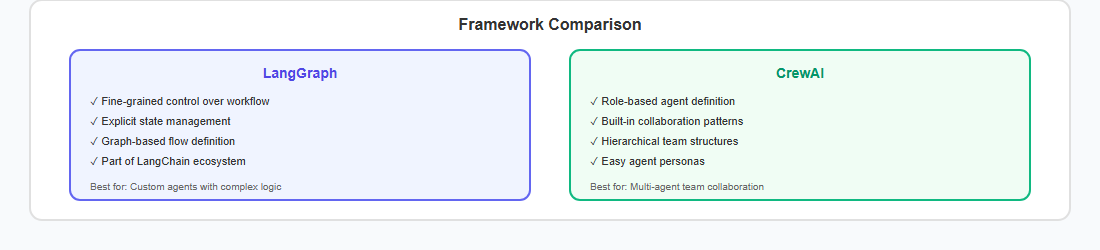
| Aspect | LangGraph | CrewAI |
|---|---|---|
| Best For | Custom workflows, fine control | Team collaboration, role-based tasks |
| Abstraction Level | Low-level, graph-based | High-level, declarative |
| Learning Curve | Steeper | Gentler |
| Flexibility | Very high | Moderate |
| State Management | Explicit, typed | Implicit, managed |
| Use Case | Complex reasoning loops | Content creation, research teams |
Production Considerations
Error Handling
from langgraph.graph import StateGraph

def safe_node(state):
    """Node with error handling."""
    try:
        result = risky_operation(state)
        return {"status": "success", "result": result}
    except RateLimitError:
        return {"status": "retry", "error": "rate_limited"}
    except Exception as e:
        return {"status": "error", "error": str(e)}

def error_handler(state):
    """Handle errors gracefully."""
    if state["status"] == "retry":
        time.sleep(5)
        return {"should_retry": True}
    elif state["status"] == "error":
        log_error(state["error"])
        return {"should_retry": False, "fallback": True}
    return {"should_retry": False}
Observability
# Using LangSmith for tracing
import os
os.environ["LANGCHAIN_TRACING_V2"] = "true"
os.environ["LANGCHAIN_API_KEY"] = "your-api-key"

# Custom logging
import structlog

logger = structlog.get_logger()

def traced_node(state):
    logger.info("node_started", node="planner", state_keys=list(state.keys()))

    result = process(state)

    logger.info("node_completed",
                node="planner",
                tokens_used=result.usage.total_tokens)
Cost Control
⚠️ Cost Warning
Agents can make many LLM calls. A single complex task might result in 10-50+ API calls. Implement safeguards:
- Set iteration limits (max 10 loops)
- Use cheaper models for planning (gpt-4o-mini)
- Cache tool results when possible
- Monitor token usage in real-time
Key Takeaways
- LangGraph is ideal for custom, complex workflows with fine-grained control
- CrewAI excels at multi-agent collaboration with distinct roles
- Start simple with ReAct, scale to Plan-and-Execute or Multi-Agent
- Always implement iteration limits and error handling
- Use observability tools like LangSmith for debugging
- Consider cost—agents can be expensive at scale
References
- LangGraph Documentation
- CrewAI Documentation
- ReAct Paper: Synergizing Reasoning and Acting in Language Models
- LangSmith: LLM Observability Platform
- Microsoft AutoGen
AI agents represent a fundamental shift in how we build applications—from reactive systems to proactive, goal-oriented ones. Whether you choose LangGraph’s fine control or CrewAI’s team abstraction, the key is starting simple and iterating based on your specific needs.
Building agents? I’d love to hear about your experiences—connect with me on LinkedIn to share your projects and learnings.
Discover more from C4: Container, Code, Cloud & Context
Subscribe to get the latest posts sent to your email.