After two decades of architecting enterprise systems and spending the past year deeply immersed in Generative AI implementations, I can state with confidence that vector databases have become the cornerstone of modern AI infrastructure. If you’re building anything involving Large Language Models, semantic search, or Retrieval-Augmented Generation (RAG), understanding vector databases isn’t optional—it’s essential.
This article distills my hands-on experience deploying vector databases across production environments, covering not just the fundamentals but the architectural decisions that separate successful implementations from failed ones.
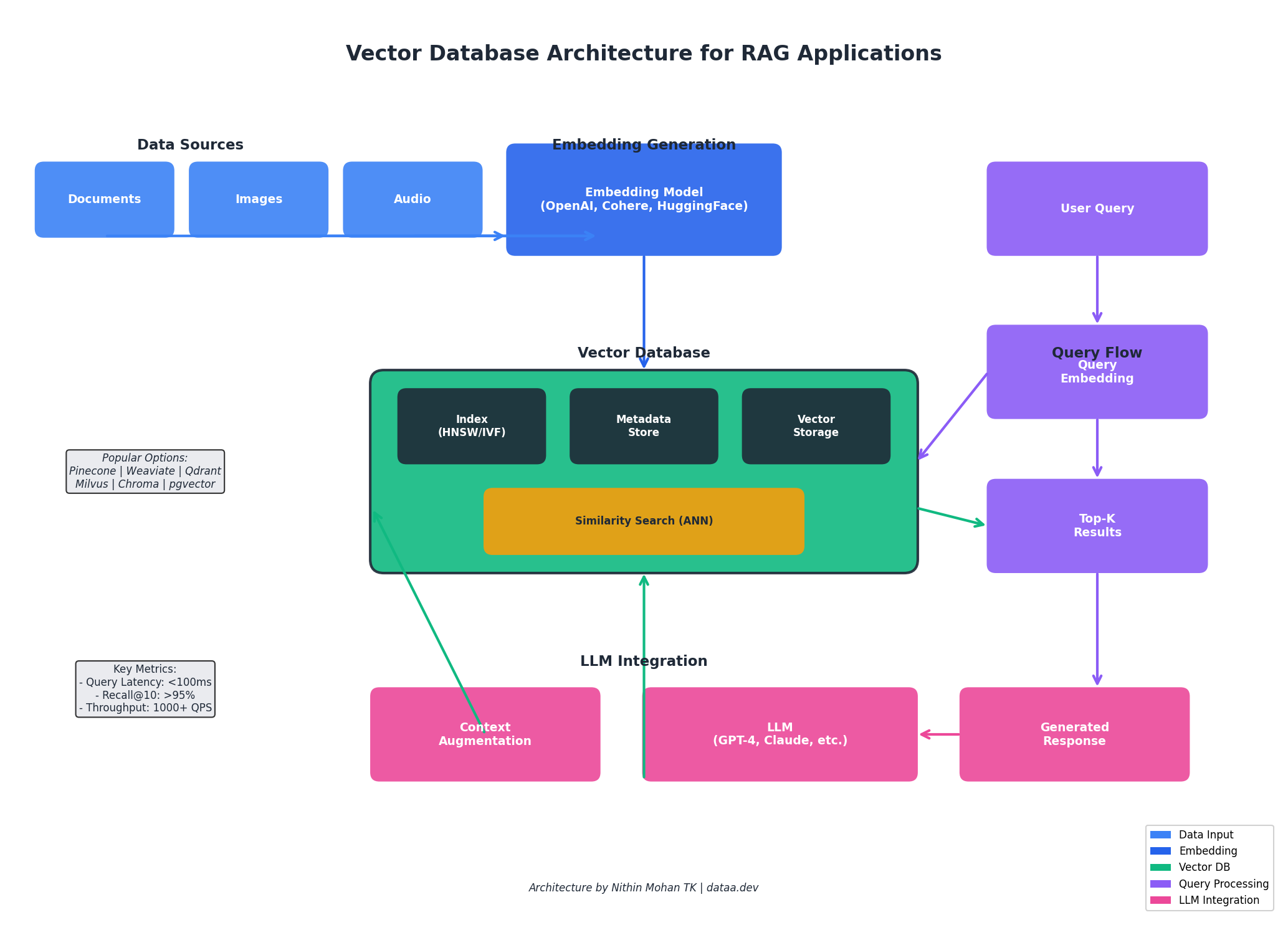
Understanding Vector Databases: Beyond the Basics
At its core, a vector database is a specialized storage system optimized for high-dimensional vector data. Unlike traditional relational databases that excel at exact matches and structured queries, vector databases are engineered for similarity search—finding data points that are semantically close to a query vector.
When you pass text, images, or audio through an embedding model (such as OpenAI’s text-embedding-ada-002 or open-source alternatives like sentence-transformers), you get a dense numerical representation—typically 384 to 1536 dimensions. These vectors capture semantic meaning in a way that enables mathematical comparison. The database then uses algorithms like HNSW (Hierarchical Navigable Small World) or IVF (Inverted File Index) to perform Approximate Nearest Neighbor (ANN) searches efficiently.
The key insight here is that vector databases trade exact precision for speed. In a billion-vector dataset, finding the mathematically closest vectors would require comparing against every single entry—computationally infeasible. ANN algorithms accept a small accuracy trade-off (typically 95-99% recall) in exchange for sub-100ms query times.
Why Vector Databases Are Critical for Modern AI Systems
The explosion of interest in vector databases directly correlates with the rise of LLMs and their inherent limitations. Large Language Models have a knowledge cutoff date and limited context windows. Vector databases solve both problems elegantly through RAG architectures:
- Knowledge Augmentation: Store your proprietary documents, FAQs, and domain knowledge as vectors. When a user asks a question, retrieve relevant context and inject it into the LLM prompt.
- Semantic Search: Move beyond keyword matching. A query for “cloud cost optimization” will surface documents about “reducing AWS spend” or “FinOps strategies” even without exact keyword overlap.
- Recommendation Systems: Find similar products, content, or users based on behavioral embeddings rather than explicit feature matching.
- Multimodal Applications: Store image, audio, and text embeddings in the same vector space for cross-modal search capabilities.
When to Use What: A Decision Framework
After deploying vector databases across diverse production environments, I’ve developed a practical decision framework. The right choice depends on your specific constraints around operational overhead, budget, scale requirements, and team expertise.
Pinecone: Best for Speed-to-Production
Use When: You need to ship fast, have budget for managed services, and want zero operational overhead. Ideal for startups building MVPs, teams without dedicated infrastructure engineers, or enterprises prioritizing time-to-market over cost optimization.
Cost Efficiency: Premium pricing (starts free, scales to $70+/month for production). You’re paying for convenience and reliability. Cost-effective when engineering time is more expensive than infrastructure costs.
Ease of Use: Excellent. 5-minute setup, comprehensive SDKs, seamless LangChain/LlamaIndex integration. Best-in-class developer experience.
Scalability: Handles billions of vectors with consistent sub-50ms p99 latencies. Serverless tier auto-scales; pod-based tier requires capacity planning.
Weaviate: Best for Hybrid Search Requirements
Use When: You need both semantic and keyword search in the same query, are building knowledge graphs, or require schema-enforced data modeling. Excellent for enterprise search, e-commerce product discovery, and content management systems.
Cost Efficiency: Open-source (self-hosted is free). Weaviate Cloud starts at $25/month. Self-hosting requires DevOps investment but offers significant savings at scale.
Ease of Use: Moderate learning curve due to schema requirements. GraphQL API is powerful but requires familiarity. Built-in vectorization modules simplify embedding generation.
Scalability: Horizontally scalable with proper cluster configuration. Handles tens of millions of vectors efficiently; requires tuning for larger datasets.
Qdrant: Best for Performance-Critical Self-Hosted Deployments
Use When: You have DevOps capability, need maximum performance with minimal resources, or require sophisticated filtering during vector search. Perfect for chatbots, real-time recommendation engines, and latency-sensitive applications.
Cost Efficiency: Excellent. Open-source and Rust-based means low resource consumption. Qdrant Cloud available for managed option. Best cost-to-performance ratio for self-hosted scenarios.
Ease of Use: Good REST and gRPC APIs. Docker deployment is straightforward. Documentation is comprehensive. Slightly steeper learning curve than Pinecone.
Scalability: Excellent horizontal scaling. Distributed mode handles large clusters. Memory-efficient design allows larger datasets on smaller hardware.
Milvus: Best for Enterprise-Scale Deployments
Use When: You’re operating at massive scale (100M+ vectors), have dedicated platform teams, or need fine-grained control over index types and performance tuning. Suited for large enterprises, research institutions, and high-volume production systems.
Cost Efficiency: Open-source but requires significant infrastructure investment. Zilliz Cloud (managed Milvus) simplifies operations. Most cost-effective at very large scale where distributed architecture shines.
Ease of Use: Steeper learning curve. Requires understanding of distributed systems concepts. Multiple index types (IVF_FLAT, IVF_SQ8, HNSW) require informed selection.
Scalability: Industry-leading. Purpose-built for billion-scale deployments. Separates compute and storage for independent scaling.
pgvector: Best for PostgreSQL-Native Workflows
Use When: You’re already running PostgreSQL, have moderate vector search needs (under 10M vectors), or need to join vector results with relational data. Ideal for adding AI features to existing applications without new infrastructure.
Cost Efficiency: Excellent if you already have PostgreSQL. No additional infrastructure costs. Performance limitations may require scaling up hardware at larger volumes.
Ease of Use: Familiar SQL interface. Simple extension installation. Lowest barrier to entry for teams with PostgreSQL experience.
Scalability: Limited compared to purpose-built solutions. Adequate for millions of vectors; struggles at tens of millions without significant optimization.
Chroma: Best for Local Development and Prototyping
Use When: You’re prototyping, learning, or building proof-of-concepts. Excellent for local development, hackathons, and educational projects. Not recommended for production workloads.
Cost Efficiency: Free and open-source. Zero infrastructure costs for development.
Ease of Use: Exceptional. pip install and you’re running. Tightest LangChain integration. Perfect for getting started quickly.
Scalability: Limited. Designed for development, not production scale. Plan migration path to production-grade solution.
Quick Reference: Decision Matrix
| Scenario | Recommended Choice | Runner-up |
|---|---|---|
| Startup MVP, need to ship fast | Pinecone | Weaviate Cloud |
| Enterprise with DevOps team | Qdrant or Milvus | Weaviate |
| Hybrid search (semantic + keyword) | Weaviate | Qdrant |
| Existing PostgreSQL stack | pgvector | Pinecone |
| Budget-conscious, self-hosted | Qdrant | Milvus |
| Billion-scale vectors | Milvus | Pinecone Enterprise |
| Learning/Prototyping | Chroma | pgvector |
| Real-time recommendations | Qdrant | Pinecone |
Implementation Best Practices
Based on production deployments, here are critical considerations:
Embedding Model Selection
# Example: Using OpenAI embeddings with proper batching
from openai import OpenAI
import numpy as np

client = OpenAI()

def get_embeddings(texts: list[str], model="text-embedding-3-small") -> list[list[float]]:
    """Generate embeddings with automatic batching for large datasets."""
    batch_size = 100
    all_embeddings = []

    for i in range(0, len(texts), batch_size):
        batch = texts[i:i + batch_size]
        response = client.embeddings.create(input=batch, model=model)
        embeddings = [item.embedding for item in response.data]
        all_embeddings.extend(embeddings)

    return all_embeddings
Chunking Strategy
Document chunking significantly impacts retrieval quality. I’ve found that semantic chunking (splitting at natural boundaries like paragraphs or sections) outperforms fixed-size chunking. Overlap between chunks (typically 10-20%) helps maintain context. For code, respect syntactic boundaries; for documentation, use heading hierarchies.
Metadata Design
Store rich metadata alongside vectors to enable filtered searches. Common patterns include document source, creation date, access permissions, and content type. This allows queries like “find similar documents from the last 30 days in the engineering namespace.”
Architecture Patterns for RAG Systems
A production RAG system involves more than just a vector database. The typical architecture includes:
- Ingestion Pipeline: Document loaders, chunking logic, embedding generation, and vector storage
- Query Processing: Query embedding, optional query expansion/rewriting, vector search with metadata filters
- Context Assembly: Ranking retrieved chunks, deduplication, context window management
- LLM Integration: Prompt construction, response generation, citation tracking
I’m currently building internal tools using LangChain + Pinecone + Azure OpenAI, with particular focus on hybrid search patterns that combine semantic retrieval with structured metadata queries. The results have been transformative for our documentation search and customer support automation.
Conclusion
Vector databases represent a fundamental shift in how we build intelligent applications. They bridge the gap between the semantic understanding of modern AI models and the practical need for fast, scalable data retrieval. Whether you’re building a chatbot, search engine, or recommendation system, investing time in understanding vector database architecture will pay dividends.
The technology is maturing rapidly—what required custom infrastructure two years ago is now available as managed services with generous free tiers. There’s never been a better time to start experimenting.
If you’re building with vector databases or exploring RAG architectures, I’d love to hear about your experiences. Connect with me on GitHub or leave a comment below.
Discover more from C4: Container, Code, Cloud & Context
Subscribe to get the latest posts sent to your email.