Introduction: Anthropic’s Claude SDK provides developers with access to one of the most capable and safety-focused AI model families available. Claude models are known for their exceptional reasoning abilities, 200K token context windows, and strong performance on complex tasks. The SDK offers a clean, intuitive API for building applications with tool use, vision capabilities, and streaming responses. This guide covers everything from basic chat completions to advanced patterns like agentic tool use and batch processing.
Capabilities and Features
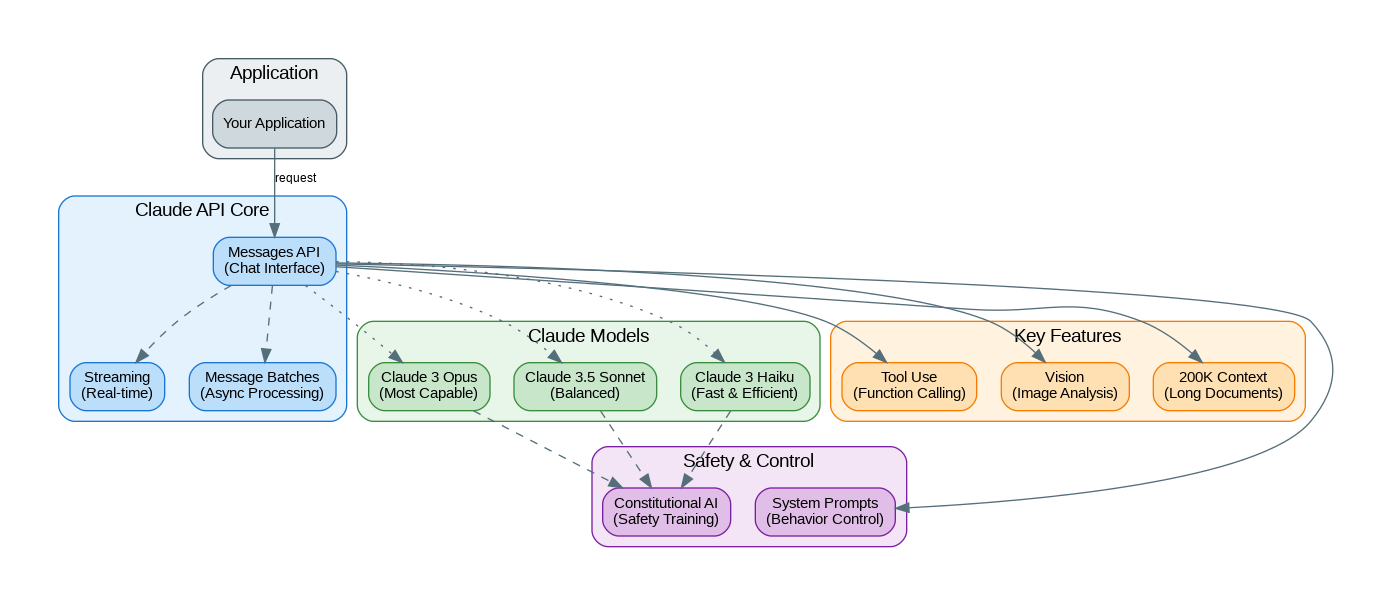
The Anthropic Claude SDK provides powerful capabilities:
- Claude 3.5 Sonnet: Best balance of intelligence and speed, excellent for most tasks
- Claude 3 Opus: Most capable model for complex reasoning and analysis
- Claude 3 Haiku: Fastest and most cost-effective for simple tasks
- 200K Context Window: Process entire codebases, books, or document collections
- Tool Use: Native function calling with parallel tool execution
- Vision: Analyze images, charts, diagrams, and screenshots
- Streaming: Real-time token streaming for responsive UIs
- Message Batches: Async processing for high-volume workloads at 50% cost
- Constitutional AI: Built-in safety training for responsible outputs
- System Prompts: Fine-grained control over model behavior
Getting Started
Install the Anthropic Python SDK:
# Install the SDK
pip install anthropic

# Set your API key
export ANTHROPIC_API_KEY="your-api-key"

# Or use in code
from anthropic import Anthropic
client = Anthropic(api_key="your-api-key")
Basic Chat Completion
Create your first Claude conversation:
from anthropic import Anthropic

client = Anthropic()

# Simple message
message = client.messages.create(
    model="claude-3-5-sonnet-20241022",
    max_tokens=1024,
    system="You are a helpful AI assistant specializing in software architecture.",
    messages=[
        {"role": "user", "content": "Explain microservices vs monolithic architecture"}
    ]
)

print(message.content[0].text)

# Multi-turn conversation
conversation = [
    {"role": "user", "content": "What are the key principles of clean architecture?"},
    {"role": "assistant", "content": "Clean Architecture, popularized by Robert C. Martin..."},
    {"role": "user", "content": "How does this apply to Python projects?"}
]

response = client.messages.create(
    model="claude-3-5-sonnet-20241022",
    max_tokens=2048,
    messages=conversation
)

print(response.content[0].text)
Tool Use (Function Calling)
Build agents with custom tools:
from anthropic import Anthropic
import json

client = Anthropic()

# Define tools
tools = [
    {
        "name": "get_weather",
        "description": "Get the current weather in a given location",
        "input_schema": {
            "type": "object",
            "properties": {
                "location": {
                    "type": "string",
                    "description": "The city and state, e.g. San Francisco, CA"
                },
                "unit": {
                    "type": "string",
                    "enum": ["celsius", "fahrenheit"],
                    "description": "Temperature unit"
                }
            },
            "required": ["location"]
        }
    },
    {
        "name": "search_database",
        "description": "Search the product database",
        "input_schema": {
            "type": "object",
            "properties": {
                "query": {"type": "string", "description": "Search query"},
                "category": {"type": "string", "description": "Product category"},
                "limit": {"type": "integer", "description": "Max results"}
            },
            "required": ["query"]
        }
    }
]

# Tool implementations
def get_weather(location: str, unit: str = "celsius") -> dict:
    return {"location": location, "temperature": 22, "unit": unit, "condition": "sunny"}

def search_database(query: str, category: str = None, limit: int = 5) -> list:
    return [{"name": f"{query} Product {i}", "price": 99.99 * i} for i in range(1, limit + 1)]

def process_tool_call(tool_name: str, tool_input: dict) -> str:
    if tool_name == "get_weather":
        result = get_weather(**tool_input)
    elif tool_name == "search_database":
        result = search_database(**tool_input)
    else:
        result = {"error": f"Unknown tool: {tool_name}"}
    return json.dumps(result)

# Agentic loop with tool use
def run_agent(user_message: str):
    messages = [{"role": "user", "content": user_message}]

    while True:
        response = client.messages.create(
            model="claude-3-5-sonnet-20241022",
            max_tokens=4096,
            tools=tools,
            messages=messages
        )

        # Check if we need to process tool calls
        if response.stop_reason == "tool_use":
            # Process all tool calls
            tool_results = []
            assistant_content = response.content

            for block in response.content:
                if block.type == "tool_use":
                    result = process_tool_call(block.name, block.input)
                    tool_results.append({
                        "type": "tool_result",
                        "tool_use_id": block.id,
                        "content": result
                    })

            # Add assistant response and tool results to messages
            messages.append({"role": "assistant", "content": assistant_content})
            messages.append({"role": "user", "content": tool_results})
        else:
            # Final response
            return response.content[0].text

# Run the agent
result = run_agent("What's the weather in Tokyo and find me 3 laptop products")
print(result)
Vision Capabilities
Analyze images with Claude:
from anthropic import Anthropic
import base64
import httpx

client = Anthropic()

# From URL
image_url = "https://example.com/architecture-diagram.png"
image_data = base64.standard_b64encode(httpx.get(image_url).content).decode("utf-8")

# From local file
with open("diagram.png", "rb") as f:
    local_image_data = base64.standard_b64encode(f.read()).decode("utf-8")

# Analyze image
message = client.messages.create(
    model="claude-3-5-sonnet-20241022",
    max_tokens=1024,
    messages=[
        {
            "role": "user",
            "content": [
                {
                    "type": "image",
                    "source": {
                        "type": "base64",
                        "media_type": "image/png",
                        "data": image_data
                    }
                },
                {
                    "type": "text",
                    "text": "Analyze this architecture diagram. What are the main components and how do they interact?"
                }
            ]
        }
    ]
)

print(message.content[0].text)

# Multiple images comparison
message = client.messages.create(
    model="claude-3-5-sonnet-20241022",
    max_tokens=2048,
    messages=[
        {
            "role": "user",
            "content": [
                {"type": "image", "source": {"type": "base64", "media_type": "image/png", "data": image1_data}},
                {"type": "image", "source": {"type": "base64", "media_type": "image/png", "data": image2_data}},
                {"type": "text", "text": "Compare these two UI designs. Which is better for user experience and why?"}
            ]
        }
    ]
)
Streaming Responses
from anthropic import Anthropic

client = Anthropic()

# Basic streaming
with client.messages.stream(
    model="claude-3-5-sonnet-20241022",
    max_tokens=1024,
    messages=[{"role": "user", "content": "Write a short story about AI"}]
) as stream:
    for text in stream.text_stream:
        print(text, end="", flush=True)

# Streaming with events
with client.messages.stream(
    model="claude-3-5-sonnet-20241022",
    max_tokens=1024,
    messages=[{"role": "user", "content": "Explain quantum computing"}]
) as stream:
    for event in stream:
        if event.type == "content_block_delta":
            print(event.delta.text, end="", flush=True)
        elif event.type == "message_stop":
            print("\n--- Stream complete ---")
Long Context Processing
from anthropic import Anthropic
from pathlib import Path

client = Anthropic()

# Process entire codebase
def analyze_codebase(directory: str) -> str:
    code_content = []
    for file_path in Path(directory).rglob("*.py"):
        content = file_path.read_text()
        code_content.append(f"### {file_path}\n```python\n{content}\n```")

    full_context = "\n\n".join(code_content)

    response = client.messages.create(
        model="claude-3-5-sonnet-20241022",
        max_tokens=4096,
        messages=[
            {
                "role": "user",
                "content": f"""Analyze this Python codebase and provide:
1. Architecture overview
2. Key design patterns used
3. Potential improvements
4. Security concerns

Codebase:
{full_context}"""
            }
        ]
    )
    return response.content[0].text

# Process long documents
def summarize_document(document_path: str) -> str:
    with open(document_path, "r") as f:
        document = f.read()

    response = client.messages.create(
        model="claude-3-5-sonnet-20241022",
        max_tokens=2048,
        messages=[
            {
                "role": "user",
                "content": f"""Provide a comprehensive summary of this document:

{document}

Include:
- Executive summary (2-3 sentences)
- Key points
- Action items
- Questions for clarification"""
            }
        ]
    )
    return response.content[0].text
Benchmarks and Performance
Claude model performance characteristics:
| Model | Input Cost | Output Cost | Speed (tokens/s) | Context |
|---|---|---|---|---|
| Claude 3.5 Sonnet | $3/M tokens | $15/M tokens | ~80 tokens/s | 200K |
| Claude 3 Opus | $15/M tokens | $75/M tokens | ~40 tokens/s | 200K |
| Claude 3 Haiku | $0.25/M tokens | $1.25/M tokens | ~150 tokens/s | 200K |
| Batch Processing | 50% discount | 50% discount | Async (24h) | 200K |
When to Use Claude
Best suited for:
- Complex reasoning and analysis tasks
- Long document processing (200K context)
- Code generation and review
- Applications requiring safety-focused outputs
- Multi-modal tasks with images and text
- High-volume batch processing (50% cost savings)
Consider alternatives when:
- Need real-time voice/audio processing (use OpenAI)
- Require fine-tuning capabilities (use OpenAI or open-source)
- Building with Microsoft ecosystem (use Azure OpenAI)
- Need image generation (use DALL-E or Stable Diffusion)
References and Documentation
- Official Documentation: https://docs.anthropic.com/
- API Reference: https://docs.anthropic.com/en/api/
- Python SDK: https://github.com/anthropics/anthropic-sdk-python
- Cookbook: https://github.com/anthropics/anthropic-cookbook
- Prompt Library: https://docs.anthropic.com/en/prompt-library
Conclusion
Anthropic’s Claude SDK offers a compelling combination of capability, safety, and developer experience. Claude 3.5 Sonnet has emerged as a favorite among developers for its excellent balance of intelligence and speed, while the 200K context window opens possibilities for processing entire codebases and document collections. The native tool use capabilities make it straightforward to build agentic applications, and the batch processing API provides significant cost savings for high-volume workloads. For teams prioritizing safety and reasoning capabilities, Claude represents one of the strongest options in the current AI landscape.
Discover more from C4: Container, Code, Cloud & Context
Subscribe to get the latest posts sent to your email.